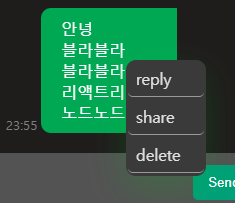
onContextMenu
우클릭 박스는 onClick말고 onContextMenu가 따로 있다.
export const Wrapper = styled.div<{ x: string, y: string }>`
width: 80px;
background-color: rgb(58, 58, 58);
border-radius: 10px;
box-shadow: 0 12px 35px rgba(0, 189, 25, 0.2);
position: absolute;
left: ${props => props.x}px;
top: ${props => props.y}px;
`

export const Menu = styled.ul`
padding: 1px 2px;
margin: 0;
`

export const Item = styled.li`
list-style: none;
font-size: 22px;
height: 35px;
width: 100%;
display: flex;
cursor: pointer;
align-items: center;
margin-bottom: 2px;
border-bottom: solid;
border-radius: 5px;
border-width: 1px;
border-color: rgba(255, 255, 255, 0.5);
&:hover{
background-color: rgb(58, 58, 58);
}
`

export const Span = styled.span`
font-size: medium;
margin-left: 8px;
color: #e2e2e2;
`
const ContextMenu = ({ x, y }: contextMenuProps) => {
    return (
        <S.Wrapper
            onClick={(e: React.MouseEvent<HTMLDivElement>) => e.stopPropagation()}
            x={x}
            y={y}
        >
            <S.Menu>
                <S.Item>
                    <S.Span>reply</S.Span>
                </S.Item>
                <S.Item>
                    <S.Span>share</S.Span>
                </S.Item>
                <S.Item>
                    <S.Span>delete</S.Span>
                </S.Item>
            </S.Menu>
        </S.Wrapper>
    )
}
ContextMenu 컴포넌트와 css는 대략 위와 같다.

interface locate {
    x: string;
    y: string;
}

const Test = () => {
    const [show, setShow] = useState(false);
    const [locate, setLocate] = useState<locate>({ x: "0", y: "0" });

    const contextMenuHandler = (e: React.MouseEvent<HTMLDivElement>) => {
        e.preventDefault();
        const { clientX, clientY } = e;
        setShow((pre) => !pre);
        setLocate({ x: clientX.toString(), y: clientY.toString() });
    }

    return (
        <>
            <div className="container" onContextMenu={contextMenuHandler}></div>
            {
                show &&
                <div className="close-wrapper" onClick={() => { setShow((pre) => !pre) }}>
                    <ContextMenu x={locate.x} y={locate.y} />
                </div>
            }
        </>
    )
}
test의 동작 react 코드이다.
e.preventDefault()로 기본 우클릭 동작을 막고 클릭된 위치를 얻고 show를 true로 바꿔준다.
.close-wrapper {
position: fixed;
top: 0;
left: 0;
width: 100%;
height: 100%;
display: flex;
align-items: center;
justify-content: center;
}
close-wrapper.css 는 다음과 같고 onClick시 show를 false로 바꿔준다.
맨 위에서 두 번째 코드블럭을 보면 ContextMenu 에서
onClick={(e: React.MouseEvent<HTMLDivElement>) => e.stopPropagation()} 으로 close-wrapper의 event가 menu에 전파되는 걸 막는다. 그래야 메뉴 클릭했을 때 닫히지 않는다.

참고로 event에서 얻는 마우스 클릭 좌표에는 위와 같은 것들이 있고 적절한 좌표를 사용해서
css에 top, left 같은 프로퍼티를 변수로 활용하면 된다.
'SW > front-end' 카테고리의 다른 글
| React, D3.js를 이용한 지도 시각화 (3) | 2024.10.01 |
|---|---|
| 최적화 관련 useRecoilState, useState (0) | 2023.08.25 |
| 채팅-React.memo() (0) | 2023.08.22 |
| 채팅 - Array.prototype.reduce() (0) | 2023.08.22 |
| 프론트 상태 관리 Recoil 사용하기 (0) | 2023.08.19 |